Skip to content
  • Home
  • Explore
    • Media Assets
    • Data Assets
  • Knowledge Base
    • Media Library
    • Data Library
    • API Documentation
    • Use cases
    • All Documentation
  • Access
    • Developer Tools
    • Media Library Login
    • Data Library Login
    • Request Access Account
Menu
  • Home
  • Explore
    • Media Assets
    • Data Assets
  • Knowledge Base
    • Media Library
    • Data Library
    • API Documentation
    • Use cases
    • All Documentation
  • Access
    • Developer Tools
    • Media Library Login
    • Data Library Login
    • Request Access Account

About Destination Palestine ODR

  • About Destination Palestine ODR
  • Who is it for?
  • Why Open Data?
  • Tourism Assets Available
  • Why contribute?
  • Request Access

Media Library

  • About Media Library
  • Getting Started
  • Using Available Media Assets
  • Media Library WordPress Plugin
  • Contributing Media Assets
  • Media Library API Documentation

Assets Library

  • About Tourism Assets Library
  • Getting Started
  • Using Available Data Assets
  • Asset Types and Fields
  • Destination Palestine WordPress Plugin
  • Destination Palestine WP Plugin Theming
  • Destination Palestine WordPress Theme 1
  • Destination Palestine WordPress Theme 2
  • Contributing Data Assets
  • Data Assets API Documentation

User Guide

  • Asset Types and Fields
  • Destination Palestine WordPress Plugin
  • Request Access
  • Using Available Data Assets
  • Destination Palestine WordPress Theme 1
  • Destination Palestine WordPress Theme 2
  • Contributing Data Assets
  • Destination Palestine WP Plugin Theming
  • Contributing Media Assets
  • Using Available Media Assets
  • Media Library WordPress Plugin

API Documentation

  • Data Assets API Documentation
  • Media Library API Documentation
  • Home
  • Docs
  • Assets Library
  • Destination Palestine WordPress Theme 1

Destination Palestine WordPress Theme 1

View Demo

Installation Steps: #

Follow these step-by-step instructions to set up the Destination Palestine WordPress theme and configure the necessary plugins.

1. Download the Theme #

Download the Destination Palestine theme from the provided URL: Download Destination Palestine

2. Upload and Activate the Theme #

  1. Go to your WordPress admin panel.
  2. Navigate to “Appearance” and select “Add New.”
  3. Choose “Upload Theme” and upload the theme file. Proceed with the activation step.

3. Install and Activate Required Plugins #

  1. Once the theme is activated, a message will appear at the top, prompting you to install and activate the required plugins.
  2. Click on “Begin installing plugins.”
  3. Proceed with the installation steps and activate all of the required plugins.

4. Import Demo Data #
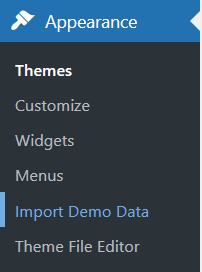
  1. After the installation process is complete, head over to the “Import Demo Data” page.
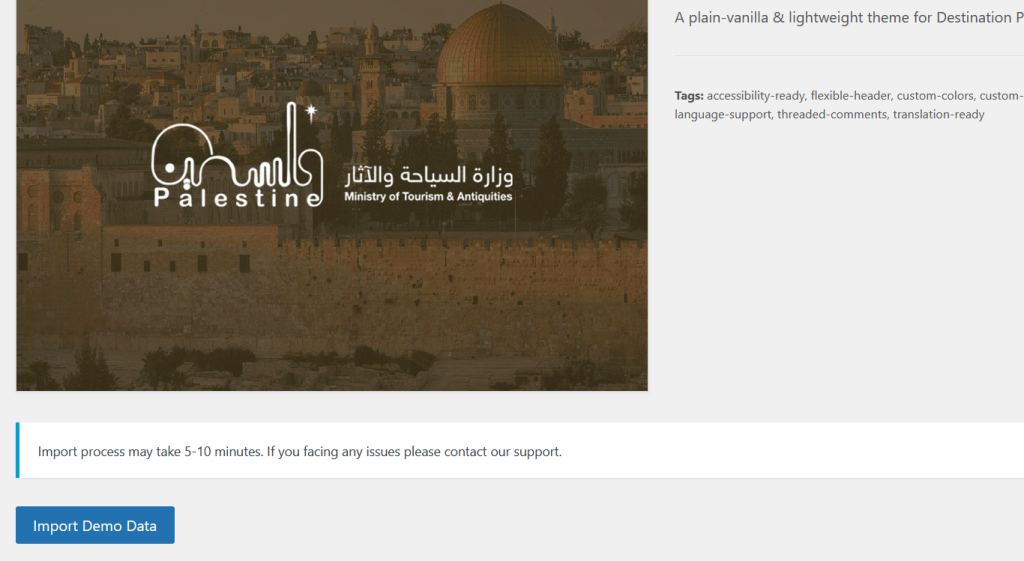
  2. Click on “Import Demo Data” to start the process.
  3. Go through the wizard to import the demo pages and settings.

Note: The demo data import will help you set up the theme with sample content and configurations to give you a head start.
Template Configuration #

The Destination Palestine WordPress theme provides a seamless and customizable experience through Elementor tools.

The header and footer of the template are constructed using Elementor templates, offering flexibility and ease of modification. For additional customization, navigate to “Templates” -> “Theme Builder” to access and modify other templates associated with the theme.

Notably, the theme includes a pre-configured listing page with filters, streamlining the process of showcasing content related to your destination or tourism website. Take advantage of these features to tailor the theme to your specific design and content preferences effortlessly.

Conclusion #

Congratulations! You have successfully set up the Destination Palestine WordPress theme and configured the required plugins. Your website should now have the initial structure and design as demonstrated in the theme demo.

Feel free to customize the imported content, settings, and design to suit your specific needs. For further assistance or detailed theme documentation, refer to the theme’s official documentation page.

Still stuck? How can we help?

How can we help?

Destination Palestine WP Plugin ThemingDestination Palestine WordPress Theme 2
Table of Contents
  • Installation Steps:
    • 1. Download the Theme
    • 2. Upload and Activate the Theme
    • 3. Install and Activate Required Plugins
    • 4. Import Demo Data
  • Template Configuration
  • Conclusion

The Destination Palestine Media Library is operated as a service to the entire Palestinian tourism sector and anyone working in/with Palestinian tourism by the Palestine Ministry of Tourism & Antiquities. All copyrights for material stored in the Library remain with the respective creators.

The Destination Palestine Media Library and part of its content was developed with the financial support of the European Union and the German Federal Ministry for Economic Cooperation and Development. Its contents are the sole responsibility of the Palestine Ministry of Tourism & Antiquities as the management unit and responsible curator of the Destination Palestine Media Library and do not necessarily reflect the views of the EU or the German Federal Ministry for Economic Cooperation and Development.

Technical design and development by Ashraf Bakri
 Tourism Digitalization & Development Consultant
www.ashrafbakri.com